Grisaille setup guide: portrait brush, projects and contact
NS. Studio · 2026-10-30
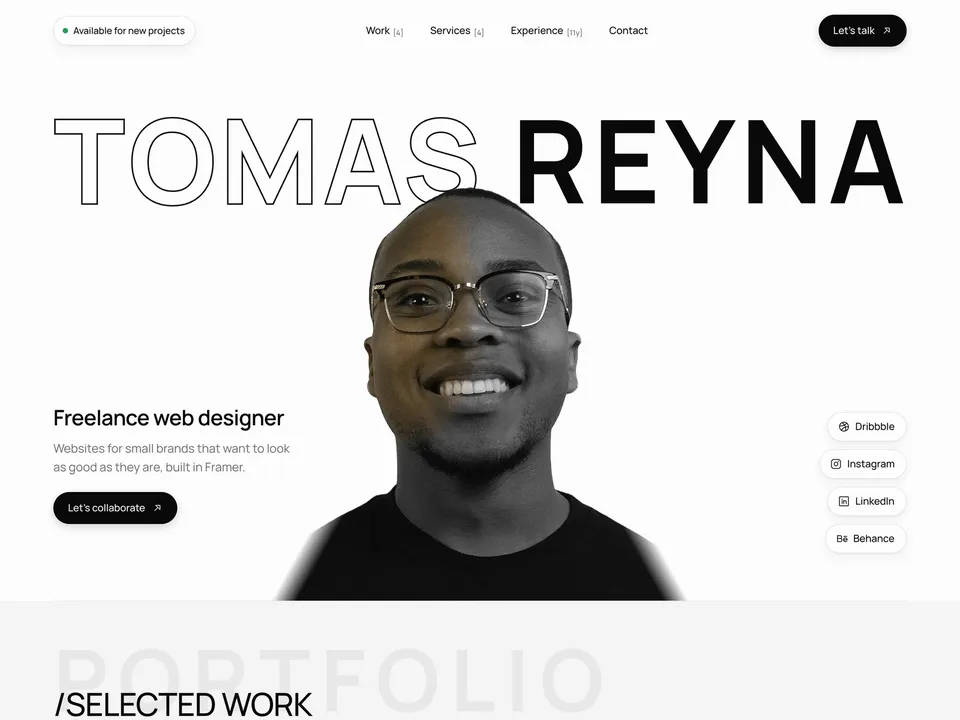
Grisaille is a free black-and-white personal site for a freelance designer or developer. It opens on a grey portrait that visitors paint back into colour with the cursor. This guide covers what to change after you remix it. Keep the live demo open in another tab to compare.
1. Your portrait and name
- Select the portrait component and set First Name and Last Name. The name sizes itself to fit the width.
- Upload your photo as Portrait. The brush works best with a cut-out portrait (background removed); with a busy background the whole photo turns grey.
- Optionally upload a separate Colour Image if you want the painted version to differ from the grey one.
- On phones it paints on tap or a sideways drag. With reduced motion on, the portrait simply fades to colour.
2. Intro and social links
Change the role line, the short pitch, the "Available for new projects" label and the Dribbble, Instagram, LinkedIn and Behance links. Delete the ones you don't use.
3. Projects in the CMS
Open the CMS from the left panel. The Projects collection has 6 made-up projects; they appear on the home page, on the Work page (with All, Client and Personal tabs) and on their own pages.
- Fill in cover, gallery, client, service, timeline, tools and the write-up for each project.
- Mark each project as client or personal work so the Work tabs sort it correctly.
- Delete the sample projects you don't replace.
4. Services and experience
The services accordion and the experience list are one rows component, not CMS. Select it and edit the Items list in the right panel. The cursor preview on the experience list shows on desktop only.
5. Contact
Select the copy-email component and set your Email. Grisaille has no contact form: visitors copy your email or click to write one.
Publish and connect your domain
Click Publish to go live on a free framer.website address. To use your own domain, upgrade the project to a Framer site plan, open Site Settings, Domains, add the domain and copy the DNS records Framer shows into your domain registrar. It usually works within an hour.
Before you publish, open Site Settings, General and replace the title, description and social image with your own, so search results and link previews show your name and not the demo's.
Tools that help
- Cal.com for "Let’s talk": a free scheduling link synced with your calendar, so clients can book an intro call instead of writing an email. New users get 20% off for 12 months through our link.
- Mobbin for project research: a library of real app and web screens to benchmark against when you write up your work.
Some links on this page are affiliate links. If you sign up, NS. Studio may earn a commission at no extra cost to you.
Need a hand?
If you'd rather not set Grisaille up yourself, template setup starts at $79.