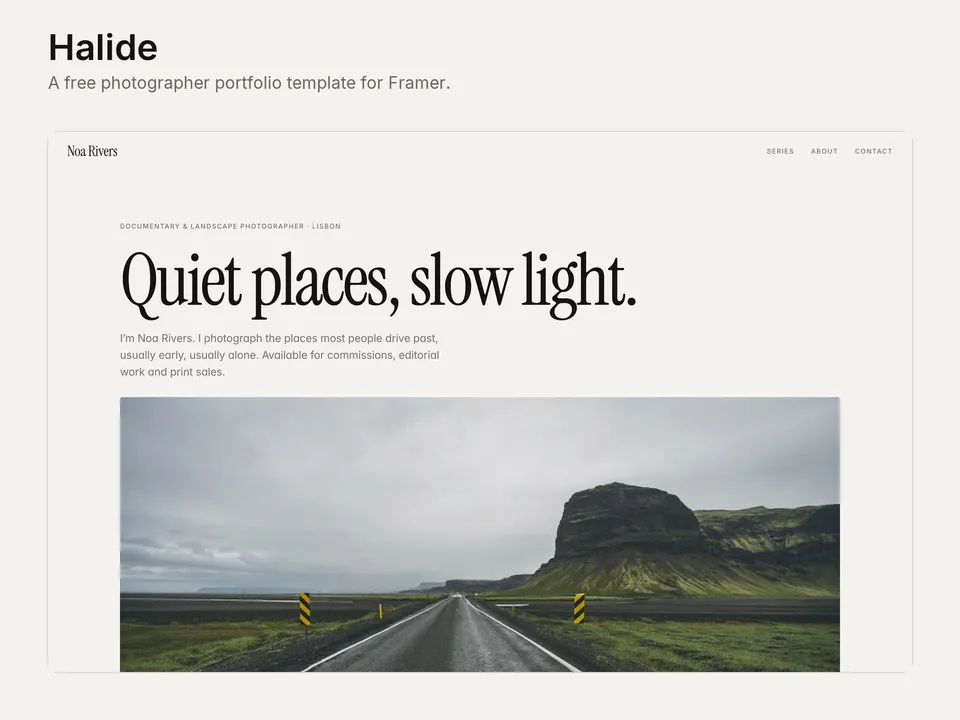
Halide setup guide: series, images and contact
NS. Studio · 2026-10-28
Halide is a free portfolio for photographers: warm paper tones, big images and a page for every series. This guide covers what to change after you remix it. Keep the live demo open in another tab to compare.
1. Intro and hero photograph
- Change the name, the "Documentary & landscape photographer" line, the headline and the short intro.
- Replace the full-width hero photograph and its caption. Use your strongest landscape-format image, at least 2400 px wide.
2. Series in the CMS
Open the CMS from the left panel. The Series collection has 6 example projects; each is a cover in the home grid and its own page.
- Fill in the title, place, year and the short summary, then write the story for the series page.
- Each series has a cover and three gallery images. Export them as high-quality JPGs about 2400 px on the long side: big enough to look sharp, small enough to load fast.
- Fill in the SEO title and description for each series so the pages show up well in search.
- Delete the example series you don't replace. Check Framer's current plan limits at framer.com/pricing before you add many more.
3. About
Rewrite the about text and the three rows below it (Published in, Exhibitions, Available for). Leave out a row rather than fill it with something you haven't done yet.
4. Contact
- Change the email address and its
mailto:link, and the line about what you take on. - Point the Instagram and Prints links in the footer at your own pages, or delete them.
- Halide has no contact form; clients write by email.
5. Colours and type
Halide uses colour and text styles, so a rebrand takes minutes: change the styles in the Assets panel and every page follows.
Publish and connect your domain
Click Publish to go live on a free framer.website address. To use your own domain, upgrade the project to a Framer site plan, open Site Settings, Domains, add the domain and copy the DNS records Framer shows into your domain registrar. It usually works within an hour.
Before you publish, open Site Settings, General and replace the title, description and social image with your own, so search results and link previews show your name and not the demo's.
Tools that help
- Cal.com for commission calls: a free scheduling link synced with your calendar, so clients can book a short call about a shoot. Add it next to your email. New users get 20% off for 12 months through our link.
- Fillout if you want a commission or licensing enquiry form with the details you need (dates, location, usage, budget). Link to the form from the contact block.
Some links on this page are affiliate links. If you sign up, NS. Studio may earn a commission at no extra cost to you.
Want more?
Gouache is our paid portfolio for artists who sell prints, with a print shop from the CMS and a commission form. If you'd rather not set Halide up yourself, template setup starts at $79.