Pilotdesk setup guide: product shot, pricing, changelog and brand
NS. Studio · 2026-10-29
Pilotdesk is a free SaaS landing page with a home page, a pricing page and a changelog. It is written for an AI support inbox, but it works for any software product. This guide covers what to change after you remix it. Keep the live demo open in another tab to compare.
1. Hero and the product shot
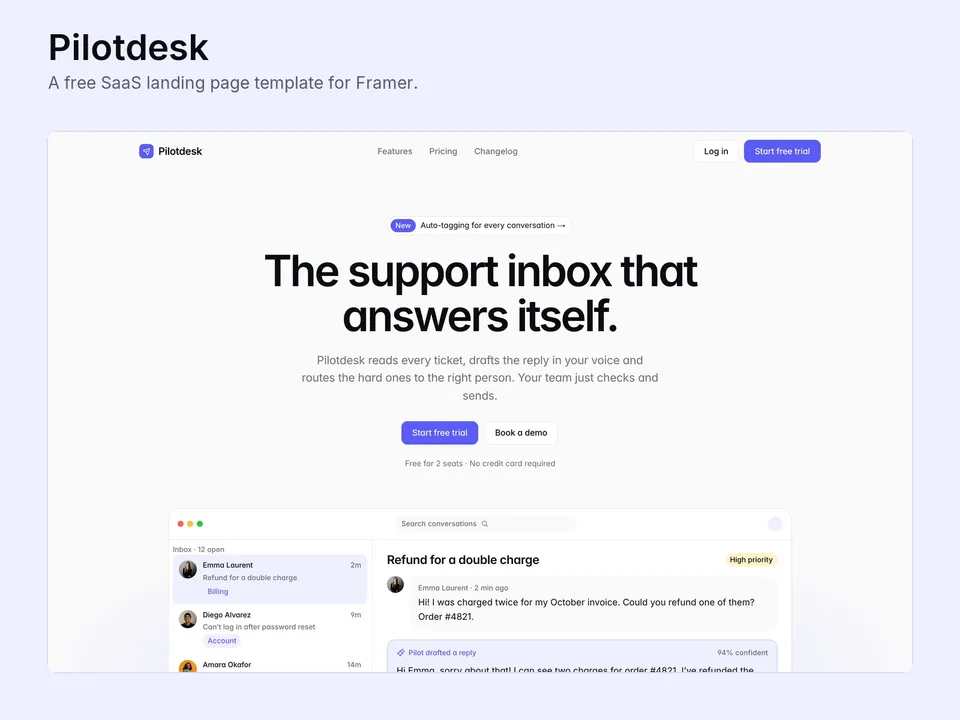
- Change the product name, the headline, the short description and the announcement pill above it.
- The product shot is built from Framer layers, not an image. Edit the inbox rows, the message and the reply right on the canvas, or delete the group and drop in a real screenshot of your product.
- Point "Start free trial", "Log in" and "Book a demo" at your app's sign-up page, your login page and your scheduling link.
2. Home page sections
- Replace the logo row with customers who agreed to be named, or delete it until you have them.
- Rewrite the six features, the stats band, the three setup steps and the testimonials. Use real numbers or leave the stats out.
- The FAQ uses an FAQ item component: duplicate one to add a question.
3. Pricing
Edit the three plans, the featured tier, the comparison table and the billing FAQ on the Pricing page. Link each plan button to the matching checkout or sign-up URL.
4. Changelog in the CMS
Open the CMS from the left panel. Each changelog entry has a version, a date, a tag, the story and an image. Delete the samples and add one entry per release. A changelog that moves is one of the best signs of life for a young product.
5. Brand
Pilotdesk uses colour and text styles: change them in the Assets panel and every page follows. Replace the logo in the navigation and the footer component once and it updates everywhere.
Publish and connect your domain
Click Publish to go live on a free framer.website address. To use your own domain, upgrade the project to a Framer site plan, open Site Settings, Domains, add the domain and copy the DNS records Framer shows into your domain registrar. It usually works within an hour.
Before you publish, open Site Settings, General and replace the title, description and social image with your own, so search results and link previews show your name and not the demo's.
Tools that help
- Chatbase if you want an AI agent on your own site that answers visitors from your docs. Paid service from $40/mo; our free Deskbell component puts it in the corner of every Framer page.
- Cal.com for the "Book a demo" button: a free scheduling link synced with your calendar. New users get 20% off for 12 months through our link.
Some links on this page are affiliate links. If you sign up, NS. Studio may earn a commission at no extra cost to you.
Want more?
Ledgr is our paid multi-page site for SaaS and fintech startups, with a CMS blog, a contact form and an editable product dashboard. If you'd rather not set Pilotdesk up yourself, template setup starts at $79.