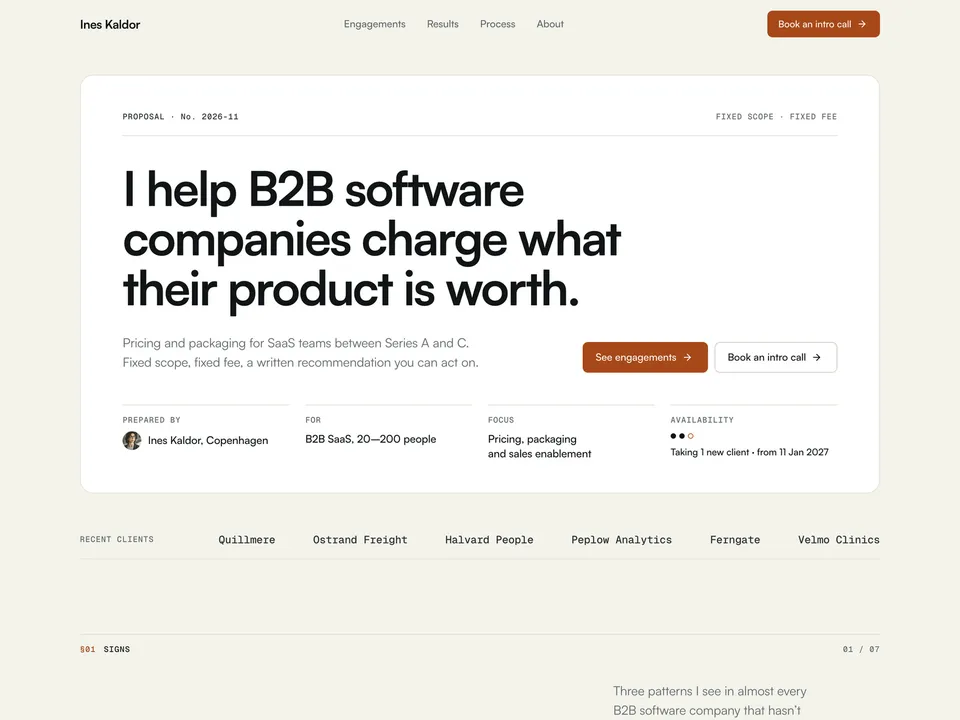
Remit setup guide: engagements, booking link, availability and results
NS. Studio · 2026-10-29
Remit is a free one-page site for independent consultants and fractional operators. It reads like a short proposal, with an Engagements picker where visitors choose how to work with you. This guide covers what to change after you remix it. Keep the live demo open in another tab to compare.
1. The cover sheet
- Change the name, the headline, the short pitch and the cover rows: prepared by, for, focus and recent clients.
- Rewrite the three "Sounds familiar?" signs in your client's words. They are the reason a visitor keeps reading.
2. Engagements and the booking link
The Engagements picker is a code component. Select it and edit everything in the right panel: no code needed.
- For each engagement set the name, fee, duration, what's included and who it's best for. Two or three options is plenty.
- Paste your scheduling link into Booking URL. The button opens it with
?engagement=<name>added, so you can see which option the visitor picked. It doesn't prefill the booking form. - Without a booking URL, the button opens an email with the engagement in the subject.
- Each engagement has its own link, like
#engagement-repricing-sprint. Send it when a client asks about one option.
3. Availability
The availability line ("Taking 1 new client") is a component you set by hand: select it and change the slots and the date. Nothing syncs with a calendar, so update it when you sign a client.
4. Results in the CMS
Open the CMS from the left panel. The Results collection has 6 sample cases; each is a card on the home page and its own page.
- Fill in the headline metric, the two smaller metrics, the situation, the approach, the outcome and a client quote.
- Only publish numbers your client is happy to see in public. If a case is confidential, describe the client ("a 60-person logistics SaaS") instead of naming it.
- Delete the sample cases you don't replace.
5. Process, about and contact
Edit the process steps and the about text on the canvas. Select the copy-email button and set your address; it copies on click. Remit has no contact form: visitors book a call or write an email.
Publish and connect your domain
Click Publish to go live on a free framer.website address. To use your own domain, upgrade the project to a Framer site plan, open Site Settings, Domains, add the domain and copy the DNS records Framer shows into your domain registrar. It usually works within an hour.
Before you publish, open Site Settings, General and replace the title, description and social image with your own, so search results and link previews show your name and not the demo's.
Tools that help
- Cal.com for the Booking URL: a free scheduling link synced with your calendar, with one event type per engagement if you like. New users get 20% off for 12 months through our link.
- Granola for the intro calls themselves: it takes notes on your Mac during the call (no bot joins the meeting) and turns them into a summary you can paste into the proposal. Free plan for the first meetings.
Some links on this page are affiliate links. If you sign up, NS. Studio may earn a commission at no extra cost to you.
Need a hand?
If you'd rather not set Remit up yourself, template setup starts at $79.