Handoff setup guide: case studies, CV, NDA work and contact
NS. Studio · 2026-10-28
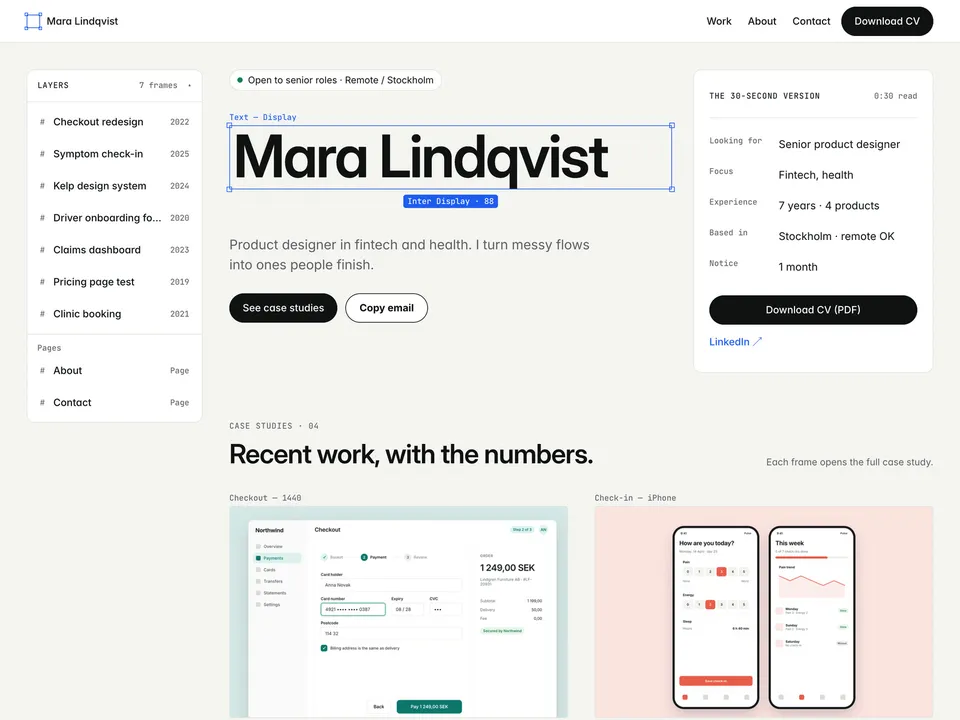
Handoff is a free portfolio for UX, UI and product designers who are looking for a job. It is laid out like a design file, and every case study opens with a 30-second version for recruiters. This guide covers what to change after you remix it. Keep the live demo open in another tab to compare.
1. Home: who you are and what you want
- Change the name, the headline and the status line ("Open to senior roles · Remote / Stockholm"). Recruiters read this line first, so name the role and the location you want.
- Fill in The 30-second version: looking for, focus, experience, based in and notice period. Keep each to a few words.
- Edit the four "How I work" steps and the "Worked with" names.
2. Your CV
The Download CV buttons link to a PDF you upload; Handoff doesn't make one for you. Export your CV as a PDF, select each Download CV button and upload it as the link in the right panel. No CV yet? Fair Copy is our free résumé template that prints to a clean PDF.
3. Case studies in the CMS
Open the CMS from the left panel. The case-studies collection has 7 example items; each one is a frame in the Layers panel, a card on the home page (for the featured ones) and its own page under /work/.
- Fill in role, team, timeline, platform, the problem and all three metrics: the page expects three.
- Write Context, Research, Decisions and Result. Short and specific beats long; the metrics carry the story.
- Add up to 4 gallery screens per case study.
- NDA work: turn on the NDA switch and the page shows an "Under NDA" placeholder with an "Ask for a walkthrough" button. The switch only hides images on the page, so also leave Cover and Gallery empty for NDA projects.
- Delete the example items you don't replace. Check Framer's current plan limits at framer.com/pricing before you add many more.
4. About
Replace the photo, the bio, the experience rows (laid out as a version history), skills, tools and education.
5. Contact
- Change the email address. The "Copy email" button copies it on click and falls back to opening a mail app.
- The contact form uses Framer's form submissions: select the form and set where submissions go (your email, or a webhook or integration) in the right panel. Send yourself a test from the published site.
- Update the LinkedIn link in the header and footer.
Publish and connect your domain
Click Publish to go live on a free framer.website address. To use your own domain, upgrade the project to a Framer site plan, open Site Settings, Domains, add the domain and copy the DNS records Framer shows into your domain registrar. It usually works within an hour.
Before you publish, open Site Settings, General and replace the title, description and social image with your own, so search results and link previews show your name and not the demo's.
Tools that help
- Cal.com if you want recruiters to book a screening call straight away: a free scheduling link synced with your calendar. Add it next to the email in the contact section. New users get 20% off for 12 months through our link.
- Mobbin for case-study research: a library of real app and web screens to benchmark against, so you can show how your solution compares with what is already out there.
Some links on this page are affiliate links. If you sign up, NS. Studio may earn a commission at no extra cost to you.
Need a hand?
If you'd rather not set Handoff up yourself, template setup starts at $79.