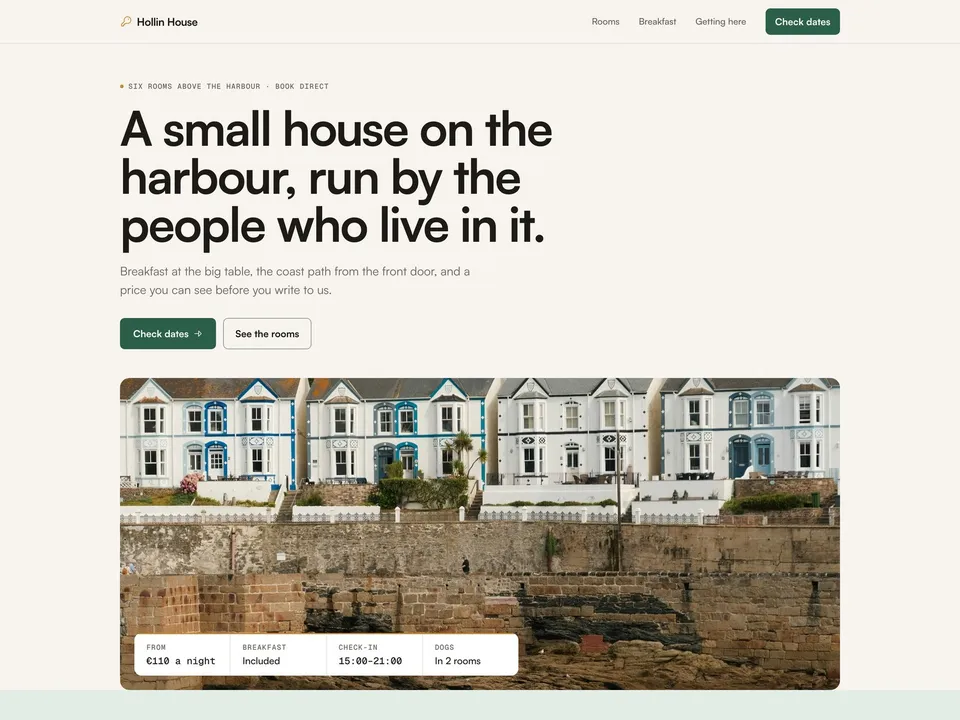
Latchkey setup guide: your rooms, your rates, your enquiries
NS. Studio · 2026-10-29
Latchkey is a free Framer template for a small guesthouse, B&B or a few cabins that take bookings themselves. This guide covers what to change after you remix it, in order: the name and fonts, the rooms and their rates, the seasons and blocked dates, the enquiry form, and your domain. Keep the live demo open in another tab to compare.
What Latchkey does and doesn't do: the quote shows a guest the price of a stay from the rates you type in, and the enquiry arrives with the dates and that price. It takes no payment, holds no room and doesn't read a live calendar. Blocked dates are a list you keep up to date yourself, and you confirm every stay by email.
1. Remix and rename
- Open the remix link from the Latchkey page (or the Framer Marketplace listing) and click Remix. The whole project is copied into your Framer account.
- Rename the project: click its name at the top of the editor. The name people see is separate: open Site Settings, General and replace the site title, description and social image, which still describe the demo guesthouse "Hollin House".
- The wordmark "Hollin House" and the footer line ("A made-up guesthouse for a Framer template; photos from Unsplash") live inside the Navigation and Footer components. Edit them once in each component and every page follows. Each page also has its own title and description under the page's settings.
- Replace the demo phone number
+353 65 555 0121and the addresshello@hollinhouse.example. Both are in the footer and beside the form on Enquire, the phone number is also in the phone menu, and the address is in the line under the FAQ on Home and in the error state of the form's submit button. They are links (tel:andmailto:), so change the link as well as the text. - The rest of the house is plain text on the pages: the hero and the fact strip under the photo ("From €110 a night", breakfast, check-in, dogs), Breakfast and the house, Getting here and good to know, the FAQ answers, and the house rules beside the form on Enquire. Hollin House, its owners, rooms, prices, reviews and blocked dates are all made up, and the photos are from Unsplash.
2. Fonts
Latchkey uses Satoshi for all text and Geist Mono for prices, dates and labels. Both are in Framer's font picker, so there is nothing to install. To change them, click an empty spot on the canvas, open the Styles panel and edit the text styles. The Latchkey Quote and Latchkey Request components have their own Font Family and Mono Family properties; set them to the same fonts.
3. Your rooms in the CMS
Open the CMS from the left panel. Latchkey has two collections: Rooms (6 sample rooms) and Reviews (6 invented reviews; replace them with real ones or delete the section until you have some). Each room has its own page at /rooms/your-room-slug, and the quote on that page reads its numbers from these fields:
- Rate: the normal price per night, for example
145. - High Rate: the price per night in high season. Leave it empty to charge the normal rate all year.
- Sleeps: the most guests the room takes.
- Included Guests: how many guests the rate covers.
- Extra Guest Fee: charged per guest above Included Guests, per night.
0for none. - Min Nights and Max Nights: the shortest and longest stay the quote accepts. Longer stays get a message asking the guest to email you.
- Cleaning Fee: charged once per stay.
0for none. - Blocked Dates: nights that are already taken, as ranges in the form
YYYY-MM-DD..YYYY-MM-DD, separated by commas, for example2027-07-10..2027-07-14, 2027-08-02..2027-08-05. Write a range the way the stay runs: the first date is the arrival and the last date is the check-out day, which stays free for the next guest. A single date blocks that one night.
The numbers are text fields, so type digits only, without a currency sign. The other fields are the card and page content: Name, Kicker ("Sleeps 2 · King · Second floor"), Summary, Features (a comma-separated list), Dog Friendly, Badge (the "MIN 2 NIGHTS" tag on the card, which is plain text, so change it when you change Min Nights), Cover, Photo 2, Photo 3, Order and the Body text.
4. The quote on Home (Picker mode)
The quote on Home has a room menu, so it can't read the CMS. Its rooms are typed into its Rooms property, one room per line, in this order:
Name | slug | base | high | sleeps | included | extra | min | max | cleaning | blocked
For example: Harbour Room | harbour-room | 145 | 175 | 2 | 2 | 0 | 2 | 21 | 0 | 2027-07-10..2027-07-14, 2027-08-02..2027-08-05. The columns are the same as the CMS fields above; leave the last column empty when a room has no blocked dates. Use the room's CMS slug in the second column, so the enquiry shows the right room name.
That means each room's numbers live in two places: the CMS (for the room pages) and this property (for Home). When you change a rate or block a date, change both. The Latchkey Request component on the Enquire page has a Rooms property too; paste the same lines there so it can turn the slug from the quote into the room name.
5. Seasons, discount, currency and tax
These are set on each Latchkey Quote instance: the one on Home and the one on the room page (one instance on the room page template covers every room). Use the same values on both.
- High Season: the dates when High Rate applies, as ranges
YYYY-MM-DD..YYYY-MM-DDseparated by commas, both ends included. The demo uses2027-06-01..2027-09-15, 2027-12-22..2028-01-03. Each night is priced on its own, so a stay that crosses into high season is part normal, part high rate. Add next year's ranges before the old ones run out. - Weekly Discount: percent off the nights and extra guests for stays of 7 nights or more.
0turns it off. - Currency (an ISO code such as
EUR,GBPorUSD) and Locale (number format, such asen-IE,en-GBorde-DE). Set the same two on the Latchkey Request component. The "€" before the rates on the room cards and room pages is plain text, so change it by hand. - Tax Note: the line under the total, "Includes VAT and breakfast" in the demo. It is text only; taxes and city fees are not calculated, so build them into your rates or say what is extra.
- Button and Footnote: "Request these dates" and "No payment here. We confirm by email within one working day."
One currency per site, and prices are per room per night: a guest can quote one room at a time.
6. Decide where enquiries go
The Enquire page uses Framer's built-in form. Select the form and choose where submissions go in the right panel: Framer keeps them in the project's form inbox and can email you or pass them to a connected tool or a webhook. How many submissions you can receive depends on your Framer plan. Publish and send yourself a test request before you share the site.
When a guest comes from the quote, the button opens /enquire with the stay in the address, and the Latchkey Request card at the top of the form shows it ("Harbour Room · 4 nights · 2 guests · quoted €740"). The card adds five hidden fields to the submission:
- Room: the room name
- Check-in and Check-out: dates as
YYYY-MM-DD - Guests
- Quoted total: the number the quote showed, without the currency sign
The visible fields (Name, Email, Phone, Room choice, Guest count, Arrival, Departure, Message) are for guests who come straight to the page. Update the Room choice menu with your room names and the Guest count menu with your largest room. Nothing is confirmed automatically: you reply, and the room is yours to hold or not.
Already have a booking engine?
If you take bookings through a booking engine, point the quote at it: set the Quote's Enquire Link to your booking page on both instances, and the nav and Home "Check dates" buttons wherever you like. The quote adds ?room=…&in=…&out=…&guests=…&total=… to the link. Booking engines use their own parameter names, so the dates won't be filled in there unless yours reads these; check before you rely on it. You can also keep the quote for prices and link a separate "Book now" button straight to the engine.
7. Publish and connect your domain
Click Publish to go live on a free framer.website address. To use your own domain, upgrade the project to a Framer site plan, open Site Settings, Domains, add the domain and copy the DNS records Framer shows into your domain registrar. Framer's help article How to connect a custom domain covers each registrar. Latchkey has two CMS collections, so it fits the Basic plan.
8. Optional tools
Latchkey works as it is. These three tools fit a small guesthouse if you need more:
- Fillout for a deposit or a longer form. Build the enquiry in Fillout instead, for example with a payment field connected to Stripe to take a deposit (check Fillout's pricing for which plan includes payments). Add hidden fields named
room,in,out,guestsandtotalin Fillout, set the Quote's Enquire Link to your Fillout form's link, and the quote fills them through the address. Or embed the form on the Enquire page with an Embed element. The Latchkey Request card only works inside Framer's own form, so remove it if you swap the form. - Chatbase for guest questions (paid). An AI agent trained on your house rules, breakfast times and directions answers "is parking free?" at any hour. Chatbase is a paid service, with plans from $40 a month. Our free Deskbell component puts a Chatbase agent in the corner of every page: paste your Agent ID into it.
- Cal.com for whole-house bookings. Group and whole-house requests usually need a call. Make a 15-minute event type in Cal.com (it has a free plan), then add an Embed element on the Enquire page with its embed code, or link a "Book a call" button to your Cal.com page.
Some links on this page are affiliate links. If you sign up, NS. Studio may earn a commission at no extra cost to you.
Try Fillout Try Chatbase Try Cal.com
Need a hand?
If you'd rather not do this yourself, template setup starts at $79: your rooms, rates and seasons filled in, and your domain connected.