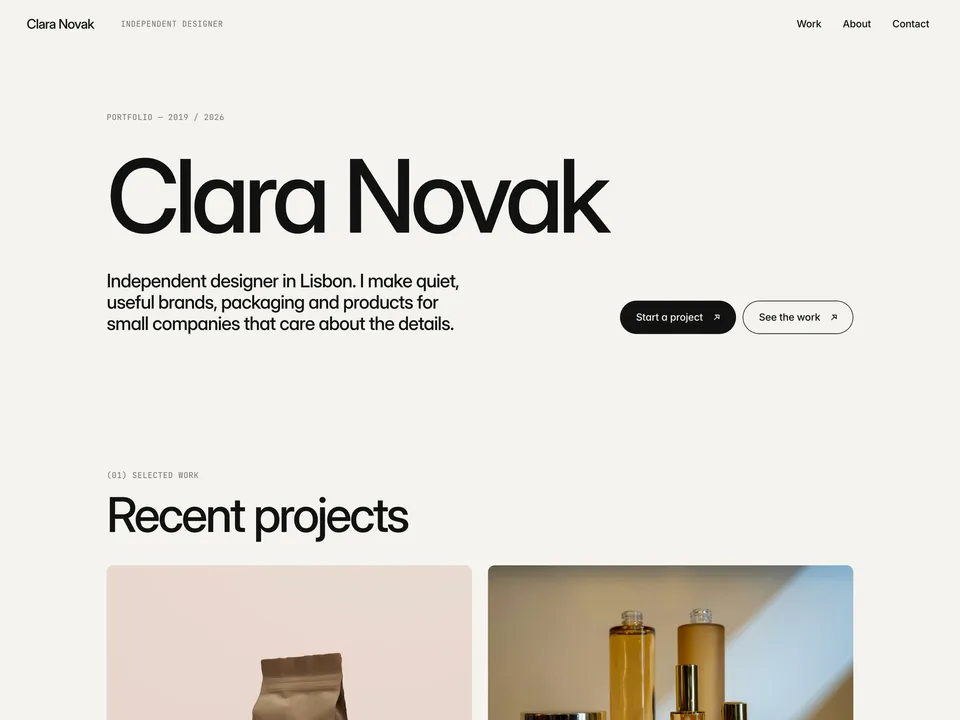
Margin Notes Lite setup guide: work cards, contact form and domain
NS. Studio · 2026-10-28
Margin Notes Lite is a free one-page portfolio for an independent designer, illustrator or small studio. It has no CMS, so everything is edited directly on the canvas. Keep the live demo open in another tab to compare.
1. Hero
Change the name, the one-line description and the "Portfolio — 2019 / 2026" label. The two buttons jump to the contact form and the work section; change their text if you like.
2. Work cards
- There are four cards, each a plain layer with a photo, a title and one line. Select the image and replace it from the right panel, then edit the text.
- To add a card, duplicate one (Cmd/Ctrl + D); to remove one, delete it.
- Lite has no project pages, so the cards don't link anywhere. If you want case studies, link a card to a PDF or an external page, or move up to the full Margin Notes.
- Use images at least 1600 px wide. Clean screenshots of real work beat stock photos.
3. About
Rewrite the short bio and the four rows next to it (Based in, Focus, Clients, Working on). Keep each row to one line.
4. Contact form
The form has name, email, company, a "What do you need?" select, a budget select and a message. To receive the messages:
- Select the form and, in the right panel, set where submissions go: your email address, or a webhook or integration if you collect leads somewhere else.
- Edit the select options to match what you offer and the budget ranges you accept.
- Send yourself a test message from the published site before you share it.
Next to the form, change the email address (and its mailto: link), the studio address and the reply time. Then update the social links in the footer.
Publish and connect your domain
Click Publish to go live on a free framer.website address. To use your own domain, upgrade the project to a Framer site plan, open Site Settings, Domains, add the domain and copy the DNS records Framer shows into your domain registrar. It usually works within an hour.
Before you publish, open Site Settings, General and replace the title, description and social image with your own, so search results and link previews show your name and not the demo's.
Tools that help
- Cal.com if you would rather offer a call than a form: a free scheduling link synced with your calendar. Link the "Start a project" button to it. New users get 20% off for 12 months through our link.
- Mobbin for case-study research: a library of real app and web screens to benchmark against when you explain your design decisions.
Some links on this page are affiliate links. If you sign up, NS. Studio may earn a commission at no extra cost to you.
Want more?
The full Margin Notes ($49) adds a CMS for case studies, project galleries, services and testimonials. If you'd rather not set Lite up yourself, template setup starts at $79.