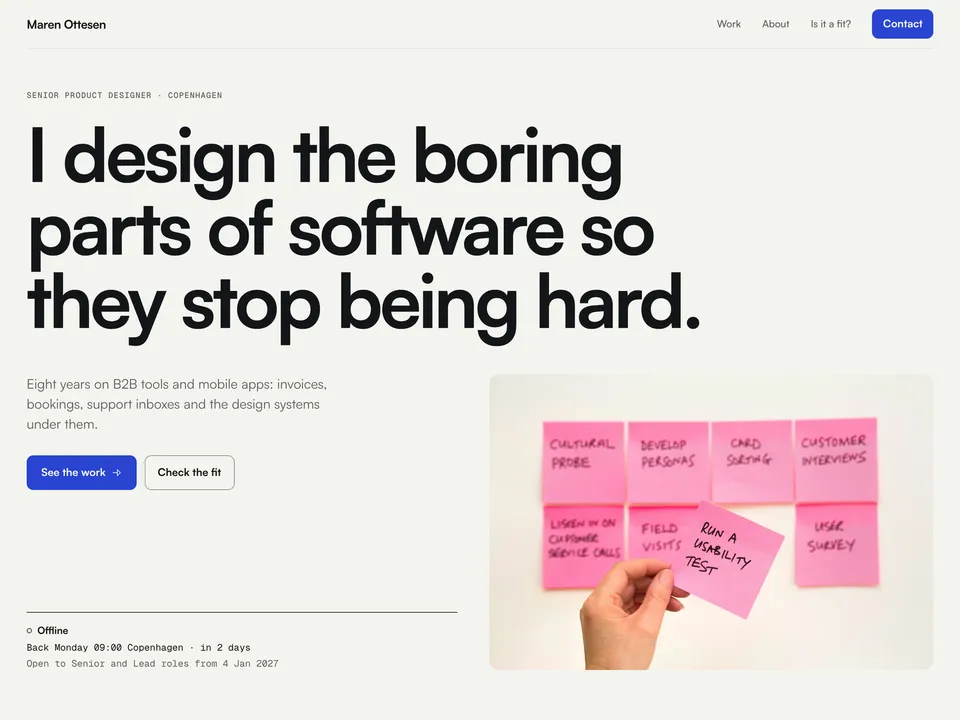
Mutual setup guide: your terms, your case studies, your contact form
NS. Studio · 2026-10-31
Mutual is a free Framer portfolio for product and UX designers looking for their next role. Its fit check lets a recruiter compare a role with your terms before they write, and the role travels into your contact form. This guide covers what to change after you remix it, in order: your name and text, your terms in the fit check, your case studies, the contact form, and publishing. Keep the live demo open in another tab to compare.
What Mutual does and doesn't do: the fit check compares the visitor's choices with the terms you type into it. It is a guide for both sides, not a filter, so every role can still be sent. It reads no calendar, converts no currency and never prints your pay floor unless you ask it to.
1. Remix and rename
- Open the remix link from the Mutual page (or the Framer Marketplace listing) and click Remix. The whole project is copied into your Framer account.
- Open Site Settings, General and replace the site title, description and social image, which still describe the demo designer "Maren Ottesen". Each page also has its own title and description in the page's settings; the case study pages take theirs from the CMS (the case title followed by the name).
- The wordmark, the links and the phone menu live in the Navigation component, and the name, the "Senior product designer · Copenhagen" line, the roles line and the legal line ("A made-up designer for a Framer template; photos from Unsplash") live in the Footer component. Edit them once in each component and every page follows.
- Replace the demo address
maren@ottesen.example. It is in the footer, the phone menu, beside the form on Contact and in the error state of the form's submit button. It is amailto:link, so change the link as well as the text. - The LinkedIn links (Contact and footer) point to linkedin.com: set them to your profile. The CV (PDF) buttons (About, Contact and footer) point to the Experience section in the demo: upload your CV and link them to the file.
- The rest is plain text on the pages: the hero, How I work and References on Home, the bio, Skills, Education and Tools on About, and the What happens next steps on Contact. Maren Ottesen, her employers, case studies, numbers and quotes are all made up, and the photos are from Unsplash. Replace the references with real quotes, or delete the section until you have some.
2. Fonts
Mutual uses Satoshi for all text and Geist Mono for labels, metrics and times. Both are in Framer's font picker, so there is nothing to install. To change them, open the Styles panel and edit the text styles. The three Mutual components have their own Font Family and Mono Family properties; set them to the same fonts.
3. Your terms in Mutual Fit
Select the fit check in the Is it a fit? section on Home. Its properties in the right panel are your terms:
- Name, Home Zone and Home City: your first name, your time zone as an IANA name such as
Europe/BerlinorAmerica/New_York, and the city to show for it. - Work Start, Work End and Min Overlap: your working hours as
HH:MMand the hours of overlap you want with the team, for example3or2.5. - Levels, Types and Modes: comma-separated lists. Levels from Junior, Mid, Senior, Lead, Staff, Principal and Manager; Types from Full-time, Part-time, Contract and Freelance; Modes from Remote, Hybrid and On-site. One step up or down the level ladder shows as Talk, not as a miss.
- Office Cities and Relocation: the cities you would go into an office in, and whether you would move for a role (Yes, For the right role, or No).
- Available From (
YYYY-MM-DD, empty means now) and Notice (a line such as "4 weeks' notice"). - Currency, Salary Floor (per year) and Day Rate Floor (per day): digits only. Leave a floor empty to hide the budget check for that kind of role. Show Floors is off by default, so the check only says "within" or "below" your range and never prints the number.
- Contact Link, Button and Footnote: where "Send me this role" goes (
/contact) and its labels.
The overlap is calculated for a working Wednesday, so it assumes a Monday to Friday week, and it uses the visitor's browser for daylight saving dates. When the overlap changes for a few weeks because the clocks move on different dates, the check says so.
4. Mutual Status and Mutual Brief
Mutual Status is the online or offline line under the hero on Home and beside the form on Contact. It has its own properties, so set Home Zone, Home City, Work Start, Work End, Levels and Available From to the same values as Mutual Fit on both instances, plus Work Days (a range such as Mon–Fri or a list such as Mon, Tue, Thu). When Available From is in the past, the line says you are open to roles now.
Mutual Brief sits at the top of the form on Contact. Set its Currency to the same code as Mutual Fit. Its Fit Link (the Change link) goes back to /#fit.
5. Your case studies in the CMS
Open the CMS from the left panel. Mutual has two collections, Cases (6 sample case studies) and Experience (5 roles). Each case has its own page at /work/your-case-slug and a card in Selected work on Home.
- The facts: Title, Company, Year, Platform, Role, Team, Timeline, Tag and a one-sentence Summary (also used as the page description).
- The story: Problem, three outcome metrics (Metric 1 to Metric 3, each with a Label; Metric 1 also shows on the card), the Body with your process under its own headings, and Next ("What I'd do next"). Use numbers you can stand behind.
- The images: Cover, Image 2 and Image 3. Write alt text for each image in the CMS, so screen readers and search engines know what it shows.
- Next Case: the slug of the case linked at the bottom of the page. The demo runs in a loop, each case pointing to the next and the last back to the first. When you add, remove or rename a case, update the Next Case fields so the loop stays closed.
- Order: the position of the card on Home.
Experience entries have Company, Title, Start, End (text, such as 2024-03 and Present), Location, a one-line Summary and Order. They show on Home and About.
6. Decide where messages go
The Contact page uses Framer's built-in form, with Name, Email, Company, Role link and Message. Select the form and choose where submissions go in the right panel: Framer keeps them in the project's form inbox and can email you or pass them to a connected tool or a webhook. How many submissions you can receive depends on your Framer plan. Publish and send yourself a test message before you share the site.
When a recruiter comes from the fit check, the role is in the page address and the Mutual Brief card shows it at the top of the form. The card adds seven hidden fields to the submission: Level, Type, Where, Team zone, Start, Budget and Fit (for example "5 of 6 match"). Without a role, the fields are empty and the card invites the visitor to check the fit first.
7. Publish and connect your domain
Click Publish to go live on a free framer.website address. To use your own domain, upgrade the project to a Framer site plan, open Site Settings, Domains, add the domain and copy the DNS records Framer shows into your domain registrar. Framer's help article How to connect a custom domain covers each registrar. Mutual has two CMS collections, so it fits the Basic plan.
8. Optional tools
Mutual works as it is. These three tools fit a designer who is interviewing:
- Cal.com for interview calls. The third step on Contact says a good fit gets a 30-minute call. Make a 30-minute event type in Cal.com (it has a free plan) and send the link in your reply, or add a "Book a call" button that links to it.
- Mobbin for case-study research. A library of real app and web screens to benchmark against when you explain your design decisions in a case study.
- Granola for interview notes. It takes notes on your computer during the call, without a bot joining the meeting, and turns them into a summary you can keep for each company.
Some links on this page are affiliate links. If you sign up, NS. Studio may earn a commission at no extra cost to you.
Try Cal.com Try Mobbin Try Granola
Need a hand?
If you'd rather not set Mutual up yourself, template setup starts at $79: your terms, case studies and contact form filled in, and your domain connected.