Teodor setup guide: projects, local time, CV and contact
NS. Studio · 2026-10-28
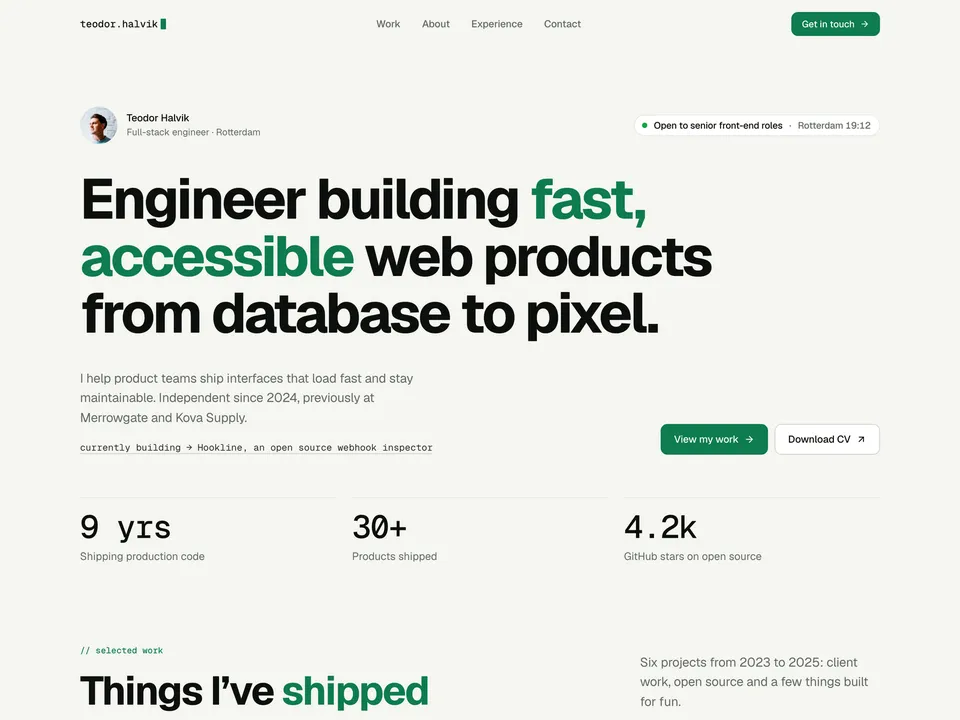
Teodor is a free one-page portfolio for software developers, with a page for every project. This guide covers what to change after you remix it. Keep the live demo open in another tab to compare.
1. Intro, availability and local time
- Change the name, the role line, the headline, the short intro and the "currently building" line.
- The availability line is the TeodorLocalTime component. Select it and set the text, the city, the time zone (an IANA name such as
Europe/Amsterdam; use the zone's main city, not your own town) and 12 or 24 hours. The time is the visitor's clock converted to your time zone, not a live online status. - Replace the three stats with numbers you can stand behind, or remove the row.
2. Projects in the CMS
Open the CMS from the left panel. The Projects collection has 6 sample projects; each is a card in "Selected work" and its own page.
- Fill in title, summary, type, year, client, role and stack, then the problem, the approach and the outcome, and two metrics.
- Set the live URL and the repo URL. The demo uses placeholders, so check both buttons on every project. Turn on Open Source for public repos.
- Add the cover and two gallery images, and fill in Social Image for every new project, or its share preview stays empty.
- Delete the sample projects you don't replace.
3. About, stack, services and experience
Edit the text directly on the canvas. The stack is a text line per group (languages, frontend, infra), not filterable tags. Replace the testimonial with a real quote, or delete it.
4. Contact and CV
- Select the TeodorCopyEmail component and set your address. It copies on click and falls back to opening a mail app.
- Download CV opens a sample PDF. Upload your own CV and set it as the link on both Download CV buttons.
- Point "Book a 20-min intro call" at your scheduling link.
- Update the GitHub, LinkedIn and Bluesky links, or delete the ones you don't use. There is no contact form; visitors write by email.
Publish and connect your domain
Click Publish to go live on a free framer.website address. To use your own domain, upgrade the project to a Framer site plan, open Site Settings, Domains, add the domain and copy the DNS records Framer shows into your domain registrar. It usually works within an hour.
Before you publish, open Site Settings, General and replace the title, description and social image with your own, so search results and link previews show your name and not the demo's.
Tools that help
- Cal.com for the "Book a 20-min intro call" button: a free scheduling link synced with your calendar. New users get 20% off for 12 months through our link.
Some links on this page are affiliate links. If you sign up, NS. Studio may earn a commission at no extra cost to you.
Need a CV?
Fair Copy is our free résumé template that prints to a clean PDF. If you'd rather not set Teodor up yourself, template setup starts at $79.