Fair Copy setup guide: your résumé, the paper view and a clean PDF
NS. Studio · 2026-10-28
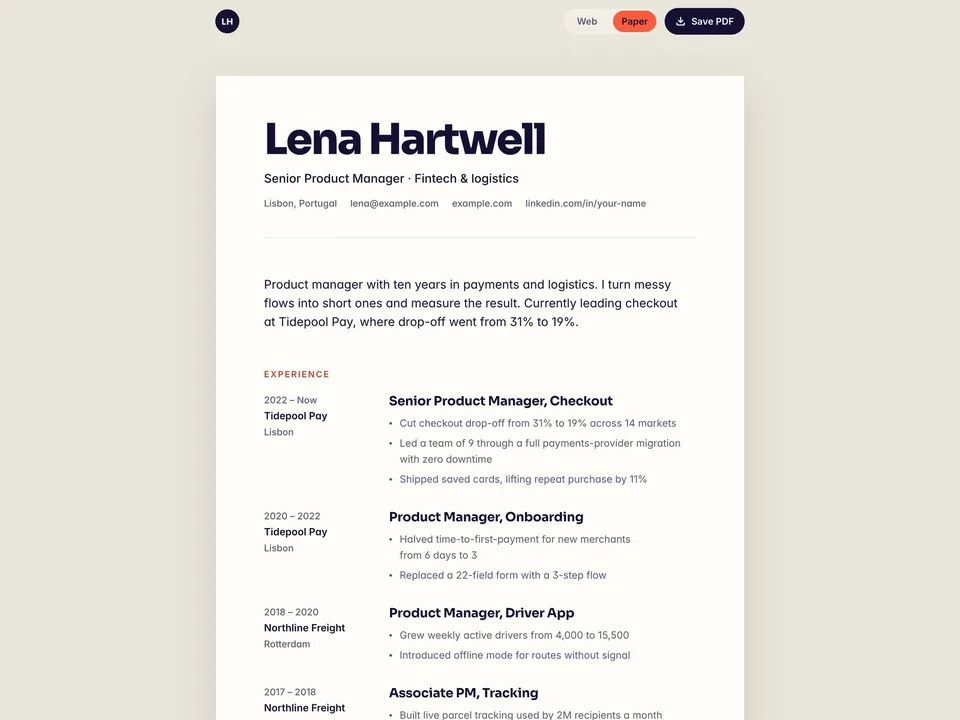
Fair Copy is a free one-page résumé website that is also your PDF: flip the Web / Paper switch and the page becomes a printable sheet. This guide covers what to change after you remix it, and how to get a clean PDF. Keep the live demo open in another tab to compare.
1. Header and summary
- Change the name, the title line, the city and the contact line (email, website, LinkedIn).
- The "Open to …" pill is the StatusPill component. Select it and set the text, the city and the Time Zone (for example
Europe/Lisbon), or turn off Local Time. - Rewrite the summary in three sentences: what you do, for how long, and one result.
2. Experience, projects and education in the CMS
Roles, projects and education come from the CMS, so one edit shows up on the web page, on the paper view and in print.
- Add each role with company, place, dates and two or three result lines. Lead every line with what changed and a number where you have one.
- Projects have their own page for a short case note. Keep it to four projects or fewer.
- Skills and languages are plain text rows on the page; edit them on the canvas.
3. Print and save the PDF
- Press Save PDF on the published site. The browser's print dialog opens; choose Save as PDF and A4 or Letter. Fair Copy doesn't generate a file itself.
- Print from a computer in Chrome. Safari and phone printing were not tested.
- The print has its own stacked layout. With the demo content it is 2 A4 pages; longer histories add pages.
- In the printed project list, change "yourname.com/projects/" to your own domain.
- The switch and print styles find layers by name ("Sheet", "Web Only", "Paper Only", "Role"). If you rename one of those layers, enter the new name in the PaperSwitch controls.
- To send someone the paper view directly, add
?view=paperto your link.
4. Contact
Change the "Email Lena" button to your address (mailto: link in the right panel) and the LinkedIn link, and rewrite the "Hiring for a … role?" line for the role you want.
Publish and connect your domain
Click Publish to go live on a free framer.website address. To use your own domain, upgrade the project to a Framer site plan, open Site Settings, Domains, add the domain and copy the DNS records Framer shows into your domain registrar. It usually works within an hour.
Before you publish, open Site Settings, General and replace the title, description and social image with your own, so search results and link previews show your name and not the demo's.
Tools that help
- Cal.com for recruiter screens: a free scheduling link synced with your calendar, so a recruiter can book a call straight from your résumé. Add it next to the email button. New users get 20% off for 12 months through our link.
Some links on this page are affiliate links. If you sign up, NS. Studio may earn a commission at no extra cost to you.
Want more?
Sidequest is the paid version: visitors walk through your career in five chapters as they scroll, with the same kind of printable résumé page. Designers can pair Fair Copy with the free Handoff portfolio.